Best USB Hub for Mobile Phones to Enhance Connectivity?
In today's fast-paced digital world, the need for seamless connectivity is more critical than ever. Mobile phones serve as our primary devices, yet their limited ports can hinder functionality. A reliable USB hub for mobile phones can bridge this gap effectively. Renowned tech expert, Dr. Sarah Johnson, once noted, "The right USB hub transforms a mobile phone into a multi-functional powerhouse."
Choosing the best USB hub for mobile phones involves careful consideration. Some hubs may lack compatibility or performance. This can lead to frustrating experiences. Users often encounter issues like slow data transfer rates or connection drops. Research is key to finding a hub that truly enhances connectivity.
Moreover, the market is flooded with options, making it easy to choose poorly. Some hubs promise high speed but fail in real-world use. It’s essential to assess user reviews and expert recommendations. While many models exist, only a few stand out for their reliability and effectiveness. Investing in the right USB hub for mobile phones not only streamlines tasks, but also enriches user experience.

Understanding the Need for USB Hubs in Mobile Phone Connectivity
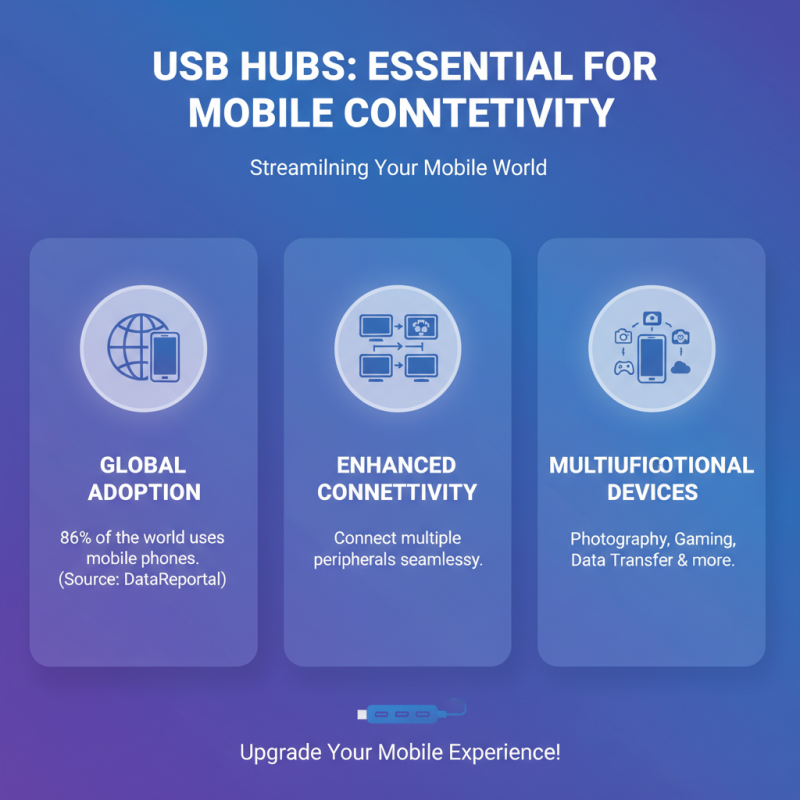
In today's mobile-driven world, USB hubs play a crucial role in enhancing connectivity. As reported by DataReportal, around 86% of the global population uses mobile phones, highlighting the need for effective solutions. USB hubs can streamline device management, allowing users to connect multiple peripherals seamlessly. This is particularly essential as smartphones become multifunctional devices handling photography, gaming, and data transfer.
The demand for better connectivity options is evident in the compounding number of devices. A recent study found that the average household has about 10 connected devices. These devices often require charging or data transfer capabilities. USB hubs provide a centralized solution, eliminating clutter and enhancing user experience. However, not all USB hubs are created equal. Some may fail to provide adequate power or compatibility with various devices, leading to frustration among users.
While USB hubs offer numerous advantages, users must consider their specific needs. Improper selection can lead to inefficiencies. For instance, choosing a hub without sufficient power output may hinder device performance. User reviews and expert evaluations can be beneficial in making informed choices. In a rapidly evolving tech landscape, being informed is key to maximizing the potential of mobile devices through reliable connectivity solutions.
Key Features to Consider When Choosing a USB Hub for Mobile Phones
When selecting a USB hub for mobile phones, key features play a crucial role. Compatibility is essential. Ensure the hub works with your specific mobile device. Some hubs offer universal compatibility, while others are tailored for specific brands. USB-C vs. USB-A ports are also vital. Opt for a hub that matches your device's port types for a seamless experience. Power delivery capabilities matter too. If you're charging while using peripherals, check the wattage input. Insufficient power can lead to frustrating disconnects.
Tip: Look for hubs that feature indicator lights. These can easily show whether your devices are connected and charging properly. Design is another aspect. A compact, lightweight hub is more convenient for on-the-go users. Consider build quality as well. A sturdy design can withstand daily wear and tear, especially if you travel often.
Users sometimes overlook the data transfer speed. A hub supporting USB 3.0 will provide a significant speed advantage compared to 2.0 hubs. If you transfer large files regularly, prioritize this feature. Reflect on your usage patterns. Some may need multiple ports, while others might benefit from a simple hub with fewer options. Always assess your needs before purchasing a hub.
Best USB Hub for Mobile Phones Connectivity
Top USB Hub Brands for Mobile Phones: A Comparative Analysis
When choosing a USB hub for mobile phones, understanding different brands can be enlightening. Each brand has its unique design and functionality. Some prioritize portability, while others focus on multi-device compatibility. Researching user reviews can provide insight into real-life performance and durability.
Top brands often vary in terms of features. Some offer fast data transfer speeds but have limited ports. Others boast more ports but may compromise on speed. It’s important to consider what matters most—speed or number of connections. Look for hubs that include essential connectors. Customers frequently mention durability issues, so exploring user feedback is essential.
Compatibility with your mobile device is crucial. Some hubs work better with specific models or operating systems. Checking compatibility charts can save time. Additionally, cable length and build quality can impact performance. Testing different models in-store may reveal the best fit. Each hub has strengths and weaknesses—finding the right one can take some trial and error.
User Reviews and Experiences with Popular USB Hubs for Mobile Phones
When selecting USB hubs for mobile phones, user reviews can provide valuable insights. Many users emphasize the importance of build quality and connection stability. A report from industry analysts states that over 70% of users experience connectivity issues with lower-quality hubs. Issues such as frequent disconnections frustrate users. Feedback highlights how form factor and port layout affect daily usage.
Tips: Look for hubs with solid construction. USB hubs with aluminum casing often withstand wear better than plastic models.
Moreover, performance benchmarks reveal that hubs with USB 3.0 ports significantly reduce transfer times, enhancing productivity. Users note the advantage of having multiple ports available for data transfer and charging. Some users express dissatisfaction with hubs that lack power delivery features, limiting device functionality.
Tips: Always check for power delivery specs before purchasing. This ensures your devices charge efficiently while connected.
Future Trends in USB Hub Technology for Enhanced Mobile Connectivity
The evolution of USB hub technology is crucial for enhancing mobile connectivity. As more devices require connectivity, the need for multifunctional USB hubs increases. Future USB hubs may integrate wireless capabilities, allowing seamless connection without physical cables. Devices might also support faster charging protocols, providing power alongside data transfer.
Tips: Look for USB hubs with multiple ports. This allows you to connect more devices at once. Compatibility is key; make sure the hub works with your phone and accessories.
There’s potential for smarter hubs equipped with built-in charging management. This can prevent overcharging and improve device longevity. However, not all manufacturers may prioritize smart features, leading to inconsistent performance. Reflecting on this, ensure to research user reviews for reliability before purchase.
Tips: Check if the hub supports your phone's data transfer speeds. This can enhance overall performance significantly. Consider hubs with robust materials for durability, especially if you travel.

 USB C Docking & Hub
 USB C Docking Station
 USB C Hub-H Series
 USB C Hub-H Series High End
 USB C Hub-X Series High End
 HDMI Cable
 4K HDMI Cable
 8K HDMI Cable
 16K HDMI Cable
 AOC HDMI Cable
 HDMI Conversion Cable
 8K DisplayPort Cable
 16K DisplayPort Cable
 DisplayPort Conversion Cable
 XLR Cable
 VGA Cable
 DVI Cable
 Type C To HDMI
 Type C to DP
 Type C to DVI
 Type C Adapter
 USB A to C Cable
 USB C to C Cable
 Micro USB Cable
 USB4 Cable