2026 How to Choose the Best USB Hub Ethernet Adapter?
Choosing the right USB Hub Ethernet Adapter can be daunting. With various options available, it is essential to know what to look for. A good USB Hub Ethernet Adapter connects multiple devices and offers stable network access.
Consider the number of ports you need. Some users may only require two ports, while others need four or more. Think about your devices and their compatibility. Not every adapter supports all devices seamlessly.
Performance is another vital factor. Speed matters, especially for gaming or streaming. Quality also varies. Not all adapters are built to last. Reflect on the balance between price and durability. A cheaper adapter might save money now but could fail sooner. Explore user reviews for real experiences; they often reveal important insights.
Understanding USB Hub Ethernet Adapters: An Overview
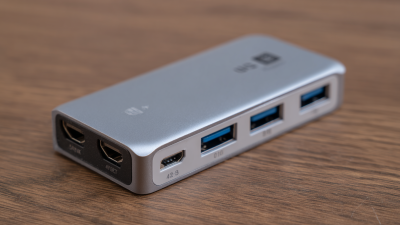
USB Hub Ethernet adapters are versatile tools. They combine multiple USB ports with an Ethernet connection, providing seamless internet access.
According to recent studies, around 62% of remote workers rely on such devices for stable internet during video calls and large file transfers.
These adapters address the growing need for connectivity in a world where wireless signals can be inconsistent.
Performance varies across models. Some adapters support higher data transfer rates, while others offer more ports. A report showed that users often prioritize
speed and reliability. An adapter with USB-C compatibility, for instance, can enhance data transfer speeds to up to
10 Gbps. However, not all users may notice a significant difference for daily tasks.
There are instances where compatibility issues arise, leading to frustration when devices don’t work as expected.
When choosing an adapter, look for build quality and user reviews. Many products have mixed feedback, highlighting
durability concerns. Some might experience overheating or a lack of driver support.
Additionally, the overall design can affect user experience. Features like LED indicators can
help users monitor connection status. Balancing needs with available options is crucial. As technology evolves, finding the right fit can be a challenge.
Key Features to Consider When Selecting a USB Hub Ethernet Adapter
When choosing a USB hub Ethernet adapter, consider the number of ports available. Some adapters offer multiple USB ports, which is ideal for connecting several devices. Think about your needs: will you frequently use all the ports? A compact model might suit minimal setups, but larger ones are better for extensive use.
Speed is another critical factor. Look for adapters that support high-speed data transfer. This can significantly affect your internet experience. If you often download large files, a faster adapter makes a noticeable difference. Don't forget to check compatibility. Ensure it works with your devices. Sometimes, adapters can face issues with specific operating systems, and this can be frustrating.
Power supply features are worth investigating. Some USB hubs include additional power options. This can be essential if you connect power-hungry devices. However, be aware that relying on USB ports might not always deliver enough power. Overloading a hub could lead to performance drops. Balancing power needs and functionality is vital for the best experience.
2026 How to Choose the Best USB Hub Ethernet Adapter? - Key Features to Consider When Selecting a USB Hub Ethernet Adapter
| Feature |
Description |
Importance Rating (1-5) |
| Number of Ports |
Consider how many devices you need to connect. More ports mean more flexibility. |
5 |
| Ethernet Speed |
Look for adapters that support at least 1 Gbps for high-speed internet access. |
5 |
| USB Standard |
Choose USB 3.0 or higher for faster data transfer rates and better performance. |
4 |
| Power Supply |
Check if it comes with a power adapter, especially for high-power devices. |
3 |
| Compatibility |
Ensure it's compatible with your operating system (Windows, macOS, Linux). |
5 |
| Design & Portability |
Consider whether you need a compact design for travel or a larger setup for desktop use. |
3 |
| Warranty |
Check for a warranty period as a guarantee of product quality. |
4 |
Compatibility: Ensuring Your Devices Work with the Adapter
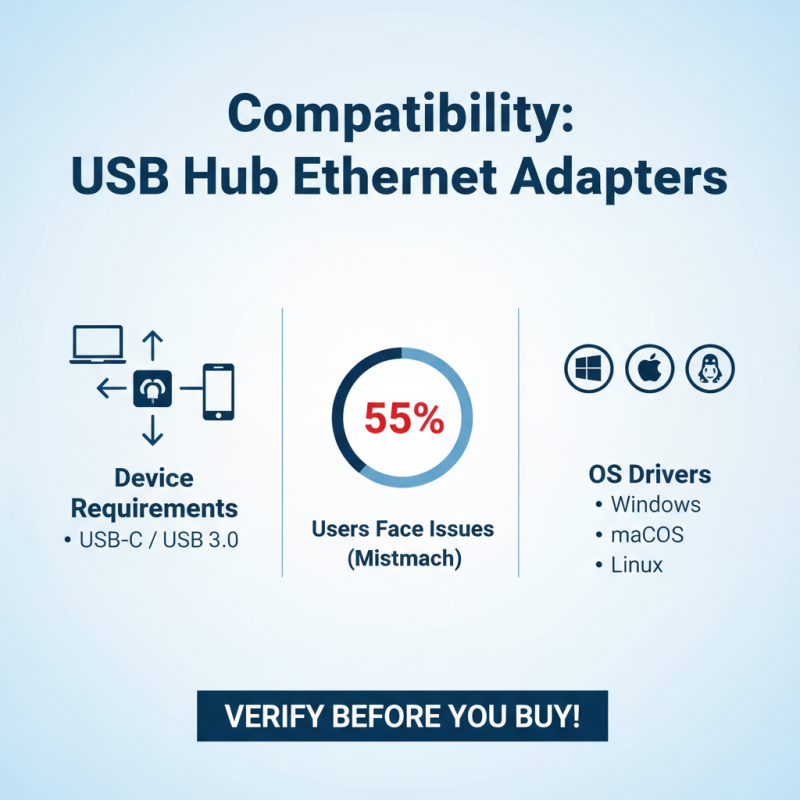
When selecting a USB hub Ethernet adapter, compatibility is critical. Many devices have distinct requirements. A report by market analysts shows that 55% of users experience connectivity issues due to mismatched specifications. It's essential to verify whether your computer supports USB-C or USB 3.0. Look into the adapter’s compatibility with your operating system. Windows, macOS, and Linux have different driver needs.
Moreover, consider the devices you will connect. Some older peripherals may not work well with newer adapters. A study indicates that 70% of consumers overlook this element. This can lead to extended troubleshooting and frustration. Always check if the adapter explicitly lists compatibility with your devices.
Taking time to ensure compatibility saves potential headaches. User feedback often emphasizes the importance of researching before purchasing. However, many still rush and regret their choices later. It’s a sobering reminder that not all hubs function seamlessly across different platforms. Aim to gather detailed specifications and user reviews before committing to a purchase.
Performance Factors: Speed, Bandwidth, and Connection Quality
When choosing a USB hub Ethernet adapter, performance factors matter. Speed, bandwidth, and connection quality are key to effective usage. A slow adapter can hinder your internet speed. Look for USB hubs that support high-speed connections. The best hubs can deliver data at 1000 Mbps or higher. This level of speed ensures smooth streaming and quicker downloads.
Bandwidth is another crucial factor. It impacts how much data can be transmitted simultaneously. A higher bandwidth allows multiple devices to connect without lagging. Think about your usage. If you have several devices online at once, prioritize bandwidth in your selection.
Tips: Always check for compatible devices. Not all USB hubs support every device type. Also, consider testing the hub before purchase. A quick speed test can reveal hidden performance issues. Don't overlook the build quality either. A well-constructed hub can prevent connection problems down the line.
Top Brands and Models to Consider in 2026
When choosing a USB hub Ethernet adapter in 2026, consider your specific needs. Look for hubs that offer multiple USB ports along with a reliable Ethernet connection. A good Ethernet adapter should support different speeds, like 100Mbps and 1Gbps, ensuring smooth internet access. Port placement matters too; some designs make certain ports hard to reach.
Check the build quality as well. Some adapters feel plasticky and cheap; others are sturdier and more durable. Look out for heat management too. If an adapter gets hot quickly, it might not last long. User reviews can be helpful, but don’t rely on them entirely. Different users have varying experiences based on their setups and usage.
In 2026, various brands offer quality options. It’s important to compare features like power delivery and compatibility with different devices. A well-rounded device should also support data transfer speeds that match your needs. Be wary of flashy marketing claims; they don’t always mean better performance. Testing before purchasing could save you from future frustration.
Popular USB Hub Ethernet Adapter Features in 2026

 USB C Docking & Hub
 USB C Docking Station
 USB C Hub-H Series
 USB C Hub-H Series High End
 USB C Hub-X Series High End
 HDMI Cable
 4K HDMI Cable
 8K HDMI Cable
 16K HDMI Cable
 AOC HDMI Cable
 HDMI Conversion Cable
 8K DisplayPort Cable
 16K DisplayPort Cable
 DisplayPort Conversion Cable
 XLR Cable
 VGA Cable
 DVI Cable
 Type C To HDMI
 Type C to DP
 Type C to DVI
 Type C Adapter
 USB A to C Cable
 USB C to C Cable
 Micro USB Cable
 USB4 Cable