How to Choose the Best USB Type C to Display Port Adapter?
Choosing the right USB Type C to Display Port Adapter can significantly enhance your viewing experience. With various models available, it is crucial to compare features. Consider the resolution support. Some adapters handle 4K, while others may only support 1080p. Check the refresh rates as well. A higher refresh rate provides smoother visuals.
Not all adapters are created equal. Connection stability is another factor to ponder. You don't want your display to cut out unexpectedly. Look for adapters with good reviews regarding reliability. Sometimes, adapters may not fit snugly, leading to disconnections.
Price can be misleading. A higher price doesn’t always guarantee better quality. Explore options and investigate the warranty. Remember, it's essential to ponder what you truly need. Finding the ideal USB Type C to Display Port Adapter might take time. It's an investment worth making for your devices.
Understanding USB Type C and DisplayPort Technology
USB Type C and DisplayPort are two critical technologies in the modern digital space. USB Type C is versatile, allowing data transfer, charging, and video output through a single reversible connector. This compact design simplifies connections and enhances usability. On the other hand, DisplayPort offers high-definition video and audio output, making it ideal for monitors and projectors. It supports high resolutions and refresh rates, which is perfect for gaming and professional work.
Understanding the compatibility between these technologies is essential. Not all USB Type C cables support video output. Users must check specifications carefully. A minor oversight here can lead to frustration and wasted time. DisplayPort also has different versions that can influence performance. For example, older DisplayPort versions may not support 4K resolutions effectively.
Choosing the right adapter can feel overwhelming. There are many options available, and each comes with its features. Some adapters may work seamlessly, while others may face issues like pixel loss or delayed response. It’s crucial to read reviews and gather insights. Personal experiences can vary widely, leading to potential pitfalls in selection. This decision can impact how devices communicate and perform together.
Identifying Your Device Compatibility Requirements
When considering a USB Type C to Display Port adapter, device compatibility is paramount. Make sure to check the specifications of your laptop or tablet. Not all devices support video output through USB-C. Some may only allow charging or data transfer. It's crucial to research which features your device offers.
Look for the USB-C port on your device. Is it marked with a symbol that indicates DisplayPort support? This detail is often understated. It's easy to overlook this small yet significant detail. When in doubt, consult the user manual or the manufacturer's website. Many users have made assumptions that later led to dissatisfaction.
Another aspect to consider is the resolution and refresh rate you'll need. Some adapters support 4K at 60Hz, while others may not. Knowing what your display requires is important. Quality might suffer if the adapter cannot meet those standards. Reflecting on your specific needs can help you make a more informed decision. Don't rush this choice; the right adapter can greatly enhance your visual experience.
How to Choose the Best USB Type C to Display Port Adapter? - Identifying Your Device Compatibility Requirements
| Compatibility |
Resolution Support |
Hookup Type |
Additional Features |
| Laptops (USB-C) |
4K @ 60Hz |
Passive |
Display Stream Compression (DSC) |
| Tablets (USB-C) |
1080p @ 144Hz |
Active |
USB Power Delivery (PD) |
| Smartphones (USB-C) |
4K @ 30Hz |
Passive |
HDCP 2.2 Compliant |
| Gaming Consoles |
4K @ 120Hz |
Active |
Support for VRR (Variable Refresh Rate) |
Evaluating Adapter Specifications and Features
When evaluating USB Type C to Display Port adapters, the specifications matter. Look for compatibility first. Ensure the adapter works with your devices. Check if it supports the desired video resolution. Higher resolutions need more bandwidth. Many adapters offer 4K support, but not all can handle 60Hz.
Another crucial feature is the build quality. A sturdy adapter typically lasts longer. Materials like aluminum can enhance durability. Heat dissipation is essential too. Some adapters overheat quickly, affecting performance. A good design prevents this issue.
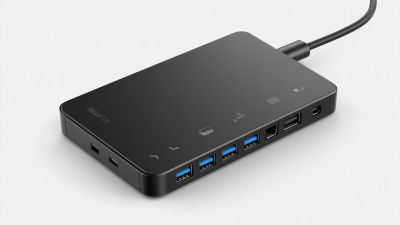
Don’t overlook additional features. Some adapters include Ethernet support or USB ports. These can add versatility. However, complexity sometimes leads to mistakes. Ensure you truly need those extra functions. Focus on your primary needs. An adapter should simplify your connectivity, not complicate it.
Considering Brand Reputation and Customer Reviews
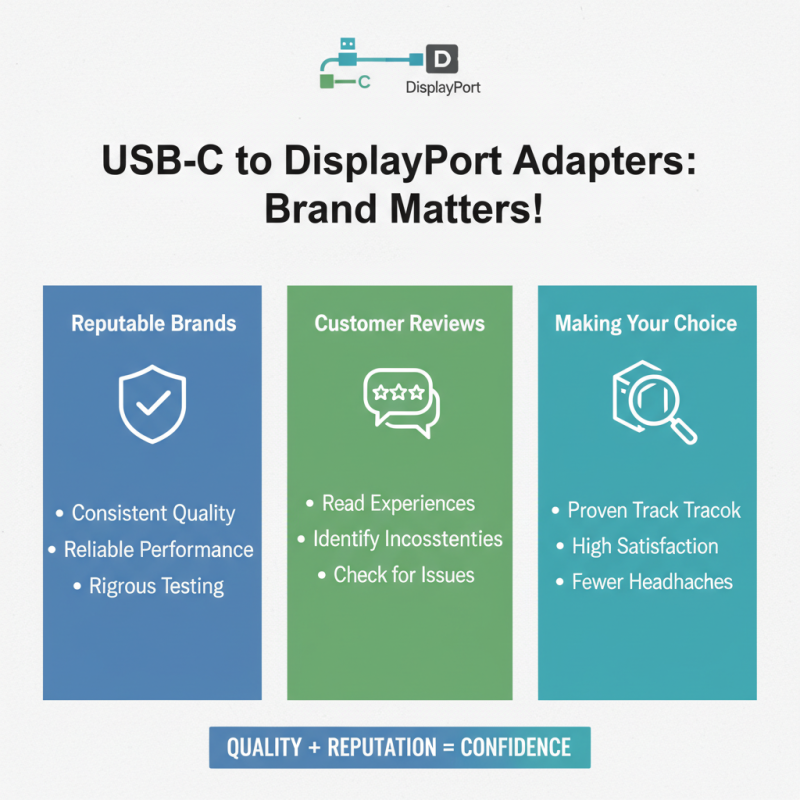
When choosing a USB Type C to Display Port adapter, brand reputation plays a significant role. Well-regarded brands often deliver consistent quality and performance. Look for those with a history of satisfied customers. Their products usually undergo rigorous testing, reducing potential issues. However, even reputable brands can have occasional mishaps. Reading customer reviews helps highlight these inconsistencies.
Customer feedback offers valuable insights. It reveals real user experiences and helps identify common issues. Some customers might face compatibility problems after trying the adapter with their devices. Others may find the build quality lacking. Pay attention to both positive and negative reviews. Not every product will receive glowing endorsements.
Be mindful of how recent the reviews are. Technology evolves quickly, and older reviews might not reflect the current state of the product. Consider the number of reviews too. A few reviews may not give a complete picture. Aim for adapters with a substantial number of ratings to better gauge their reliability. This process can feel overwhelming, but it’s crucial for your purchase decision.
Budgeting for Quality vs. Cost-Effective Options
When considering USB Type C to Display Port adapters, budgeting is crucial. Many users want quality without breaking the bank. A cheap adapter might seem like a great deal, but will it deliver the performance you need? High-quality options often provide better build materials and durability. These factors may help avoid frequent replacements.
Cost-effective options are tempting. They often appear perfectly functional at first glance. However, testing can reveal their true nature. Some adapters may not support higher resolutions or refresh rates. This could affect your overall viewing experience. Investing a bit more money upfront might safeguard you from future frustrations.
Balance is key when making a choice. Consider what features are essential for your setup. Do you prioritize portability, resolution, or reliability? Understanding your own needs can guide you in selecting the right adapter. Sometimes, it's worth spending a little extra for peace of mind and better performance.

 USB C Docking & Hub
 USB C Docking Station
 USB C Hub-H Series
 USB C Hub-H Series High End
 USB C Hub-X Series High End
 HDMI Cable
 4K HDMI Cable
 8K HDMI Cable
 16K HDMI Cable
 AOC HDMI Cable
 HDMI Conversion Cable
 8K DisplayPort Cable
 16K DisplayPort Cable
 DisplayPort Conversion Cable
 XLR Cable
 VGA Cable
 DVI Cable
 Type C To HDMI
 Type C to DP
 Type C to DVI
 Type C Adapter
 USB A to C Cable
 USB C to C Cable
 Micro USB Cable
 USB4 Cable