How to Choose the Best USB C Docking Station for Your Needs?
Choosing the right Docking Station USB C can significantly enhance your productivity. As remote work grows, professionals seek reliable connectivity solutions. Reports indicate that USB-C docking stations have surged in popularity, with a 35% increase in sales over the past year alone. This trend highlights the vital role these devices play in modern work setups.
Industry expert Dr. Emily Johnson states, “A Docking Station USB C is essential for seamless multitasking.” Her insights emphasize the need for compatibility and versatility. Users often face choices that may seem overwhelming. Failing to consider power delivery, data transfer rates, and port selection can lead to frustration.
Many overlook these aspects, and the consequences can be significant. For example, inadequate bandwidth may slow down tasks and affect performance. Additionally, users may not realize that not all docks support the same peripherals. Research suggests spending time comparing options can save headaches down the line. The right Docking Station USB C is an investment in efficiency and convenience.
Understanding USB-C Docking Stations and Their Benefits
USB-C docking stations have transformed how we connect devices. These versatile peripherals allow users to connect multiple devices through a single port, significantly enhancing productivity. According to a study by IDC, nearly 70% of professionals now utilize docking stations, recognizing their importance in modern workspaces.
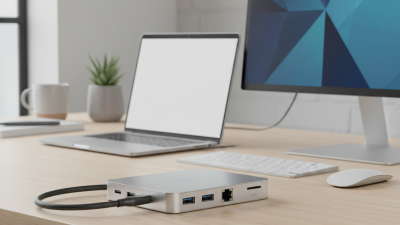
One key benefit of USB-C docks is their ability to simplify cable management. With a single connector, you can link laptops, monitors, and peripherals. This reduces clutter and improves organization. Research from TechAisle indicates that organizations using docking stations report a 20% increase in workplace efficiency.
Tips for choosing the right docking station:
- Check Compatibility: Ensure it works with your devices. Not all USB-C ports support video or data transfer.
- Look for Power Delivery: A dock that supports power delivery can charge your laptop while connected, reducing the number of chargers you need.
- Prioritize Ports and Connectors: Assess the types and number of connections you require. More ports mean more flexibility.
However, there can be issues with driver compatibility or firmware updates, leading to frustration. Taking time to read reviews can help mitigate this risk. Adopting USB-C docking stations can lead to significant advantages, but it's essential to choose wisely.
Key Features to Consider When Selecting a USB-C Docking Station
When selecting a USB-C docking station, several key features should guide your decision.
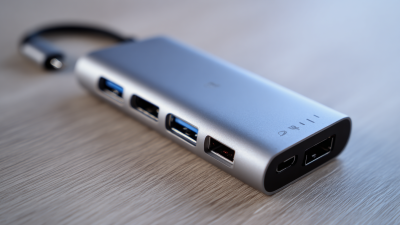
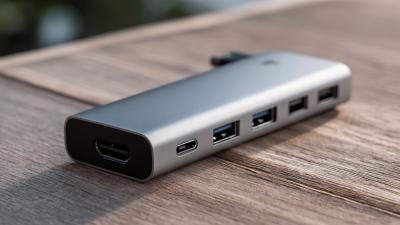
Consider the number and type of ports available. Look for multiple USB-A and USB-C ports along with
HDMI or DisplayPort options. This variety ensures you can connect various devices easily. Often,
users overlook the importance of Ethernet ports, which can provide a reliable wired internet connection.
Charging capabilities are another critical factor. Some docking stations support
Power Delivery (PD), allowing you to charge your laptop while using other peripherals.
Check the wattage output as it varies by model. If you own multiple devices, make sure the dock can handle their power
requirements simultaneously.
Lastly, the build quality is essential for long-term use. Look for sturdy materials that reduce wear and tear. Consider also
the size and design. A compact dock is convenient for travel, but ensure it doesn't compromise functionality. Many users find
that a visually appealing design enhances their workspace.
Focus on these features for a docking station that meets your unique needs.
How to Assess Compatibility with Your Devices and Operating Systems
When considering a USB C docking station, compatibility is crucial. Start by examining the devices you plan to use. Different laptops, tablets, and smartphones have varying port types and functionalities. Ensure the docking station supports the specific USB C version that corresponds with your devices. For example, Thunderbolt 3 is a fast connection type but not every USB C dock supports it. Check the specifications carefully.
Tips: Always cross-check your device’s manual for USB C specifications. This can drastically reduce confusion and improve compatibility choices.
Operating system is another factor. Different OS may require specific drivers for full functionality. Some docks may only fully integrate with macOS or Windows but not both. It's wise to visit forums or tech support sites for user experiences. This can provide insight into any issues you might face.
Tips: Consider the common issues faced by users with your operating system. A little research can prevent future frustration.
Evaluating Performance Factors: Speed, Power Delivery, and Ports
When selecting a USB-C docking station, performance is key.
Speed is critical. Look for USB-C docks that support high data transfer rates, especially if you transfer large files frequently. Some docks offer USB 3.1, which can provide speeds up to 10Gbps. This is essential for creative professionals who need quick access to their data.
Power delivery is another important factor. It's not just about connecting devices; it's about charging them efficiently too. Many docks offer power delivery of up to 100W, which can charge laptops while connected to peripherals. An adequate power supply can reduce downtime and enhance productivity. However, consider your setup. Some devices may not support high power rates, so check compatibility before making a purchase.
Ports are the lifeblood of any docking station. Consider what you'll connect. HDMI, Ethernet, and USB-A ports may be crucial depending on your devices. You might find yourself wishing for more ports if your current setup lacks connectivity options. Scrutinize the layout; some docks may crowd ports together, making them hard to access. Reflect on your current and future needs; flexibility can safeguard your investment.
Top Brands and Models of USB-C Docking Stations to Explore
When selecting a USB-C docking station, consider several top brands and models that are widely recognized for quality and performance. Look for options that offer multiple USB ports, HDMI outputs, and high-speed data transfer capabilities. Some stations even provide Ethernet connectivity for stable internet access. Pay attention to the maximum output for charging your devices, as some models can power laptops while connecting peripherals.
It’s important to examine user reviews and expert opinions about these brands. Users often share useful insights about real-world performance and compatibility issues. Some brands may excel in build quality, while others are more affordable but might lack certain features. Identifying your primary needs—like the types of devices you’ll connect or the amount of data transfer required—can guide your choice. Every docking station may have its strengths and weaknesses, making it essential to reflect on your usage scenarios.
Some users face compatibility challenges when connecting various devices. Research how each model performs with your specific laptops or tablets. You might find that some models work seamlessly with Macs but have issues with Windows machines. Ultimately, your ideal dock will depend not only on features but also on how well it integrates with your everyday tech.
USB-C Docking Station Features Comparison

 USB C Docking & Hub
 USB C Docking Station
 USB C Hub-H Series
 USB C Hub-H Series High End
 USB C Hub-X Series High End
 HDMI Cable
 4K HDMI Cable
 8K HDMI Cable
 16K HDMI Cable
 AOC HDMI Cable
 HDMI Conversion Cable
 8K DisplayPort Cable
 16K DisplayPort Cable
 DisplayPort Conversion Cable
 XLR Cable
 VGA Cable
 DVI Cable
 Type C To HDMI
 Type C to DP
 Type C to DVI
 Type C Adapter
 USB A to C Cable
 USB C to C Cable
 Micro USB Cable
 USB4 Cable