Ultimate Tips for Choosing the Best USB Type C to Display Port Adapter
When looking to connect your USB Type C device to a display, the right adapter can make all the difference. The USB Type C to Display Port Adapter is essential for anyone seeking high-quality video output from their laptops, tablets, or smartphones. With a plethora of options available on the market, selecting the best adapter can often be overwhelming. However, understanding the key features and specifications can help simplify the decision-making process.
In this guide, we will explore the ultimate tips for choosing the best USB Type C to Display Port Adapter. From factors like compatibility and resolution support to build quality and additional functionalities, each aspect plays a critical role in ensuring a seamless connection experience. By equipping yourself with the necessary knowledge, you can confidently select an adapter that meets your specific needs, elevating your productivity and enhancing your overall viewing experience.
Understanding USB Type C and DisplayPort Standards: A Technical Overview
USB Type C and DisplayPort are pivotal in the realm of modern connectivity, catering to the increasing demand for high-speed data transfer and seamless video output. The USB Type C standard, which emerged from the USB Implementers Forum (USB-IF), boasts a reversible connector and supports power delivery of up to 100 watts, enabling not only data transmission but also charging capabilities. According to the USB-IF, as of 2021, more than 1.4 billion devices were projected to utilize USB Type C connectors globally, signaling its rapid adoption across the tech landscape.
On the other hand, DisplayPort, established by the VESA (Video Electronics Standards Association), is designed to deliver high-resolution video and audio from a source device to a display. The latest iterations, such as DisplayPort 2.0, support resolutions up to 16K at 60Hz, making them ideal for cutting-edge graphics and immersive experiences. Industry reports indicate that DisplayPort interfaces accounted for over 40% of the global video interface market in 2022, a testament to their relevance in professional setups where high fidelity is a must. Understanding these standards is crucial for consumers looking to select the right USB Type C to DisplayPort adapter, ensuring compatibility with the burgeoning assortment of devices equipped with these technologies.
Ultimate Tips for Choosing the Best USB Type C to Display Port Adapter
| Feature |
Description |
Importance |
| Compatibility |
Ensure the adapter supports both USB-C and DisplayPort standards. |
High |
| Resolution Support |
Check for support of resolutions up to 4K or higher. |
High |
| Bandwidth |
Look for adapters offering high bandwidth to avoid lag. |
Medium |
| Cable Length |
Consider the length of the cable for your setup requirements. |
Medium |
| Build Quality |
Durability and materials used can affect longevity. |
High |
| Price |
Evaluate if the price aligns with features and capabilities. |
Medium |
| Additional Features |
Support for charging or data transfer additional to video output. |
Low |
Comparative Analysis of USB Type C to DisplayPort Adapters on the Market
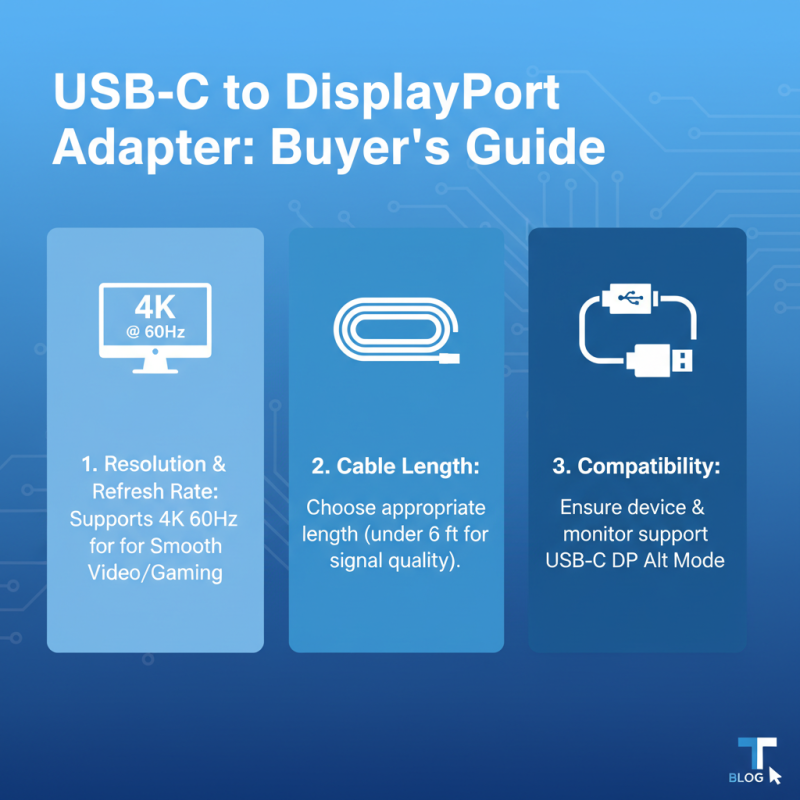
When evaluating USB Type C to DisplayPort adapters available on the market, it is essential to consider various aspects that influence performance and compatibility. One of the critical factors is the supported resolution and refresh rate. Many adapters boast 4K resolution at 60 Hz, making them ideal for high-definition displays and gaming. However, some low-cost options may only support lower resolutions or refresh rates, which can severely impact the viewing experience. Therefore, verifying the specifications is crucial before making a purchase to ensure that the adapter meets your display requirements.
Another important consideration is the design and durability of the adapter. With frequent plugging and unplugging, a flexible and robust design can prolong the adapter's lifespan. Look for features such as reinforced connectors and braided cables that can withstand daily wear and tear. Additionally, compatibility with various devices, including laptops, tablets, and televisions, should be assessed to ensure versatility. Reading reviews and performance comparisons can provide insights into how different models fare in real-world scenarios, helping you make an informed choice that aligns with your needs.
Comparison of USB Type C to DisplayPort Adapter Features
Key Features to Consider When Selecting a USB Type C to DisplayPort Adapter
When selecting a USB Type C to DisplayPort adapter, there are several key features to keep in mind to ensure compatibility and performance. First and foremost, check the resolution and refresh rate supported by the adapter. An ideal adapter should support at least 4K at 60Hz for a smooth visual experience, especially if you plan to use it for gaming or high-definition video streaming. Additionally, consider the cable length; a longer cable can provide flexibility, but it may also impact signal quality if it exceeds recommended lengths.
Another important factor is the build quality of the adapter. Look for options with sturdy connectors and durable materials to withstand regular use. Heat dissipation is also a notable aspect; adapters that incorporate better thermal management will ensure consistent performance without overheating, which is crucial during extended sessions.
Tip: Always verify the compatibility of the adapter with your devices before purchasing. This involves checking the specifications of both your USB-C device and the DisplayPort monitor to ensure seamless connectivity. Additionally, reading customer reviews can provide insights into the actual performance and reliability of the adapter in real-world scenarios. By focusing on these key features, you can make a more informed decision that aligns with your needs.
Industry Insights: Compatibility and Performance Metrics of Adapters
When selecting a USB Type C to Display Port adapter, understanding compatibility and performance metrics is crucial for optimal usage. USB Type C has rapidly become a standard, but not all devices support the same functionalities. It’s essential to check whether your device, whether it’s a laptop, tablet, or smartphone, supports DisplayPort Alt Mode; this mode allows video output through the USB Type C connection. If your device lacks this feature, the adapter will not fulfill its purpose, leading to frustration and wasted time.
Performance metrics, such as resolution support and refresh rates, are also significant factors to consider. Most adapters allow resolutions up to 4K at 60Hz, but some may only support lower resolutions or reduced refresh rates depending on the specifications of the adapter and the connected devices. Assessing the bandwidth capability of the adapter can help ensure you achieve the best possible performance for your display needs. Additionally, considering the build quality and cable length—both of which can impact performance—will ensure that the solution you choose reliably meets your connectivity needs without compromising on image quality or user experience.
Future Trends in USB-C to DisplayPort Technology and Emerging Standards
As the landscape of display technology continues to evolve, USB-C to DisplayPort adapters are becoming increasingly significant. Emerging trends suggest a consistent shift towards higher resolutions and refresh rates. With the rise of 8K displays and the need for efficient data transfer, future USB-C specifications are likely to enhance bandwidth capabilities, allowing for richer and more dynamic visual experiences. This evolution not only supports high-definition displays but also facilitates innovative applications in gaming, professional multimedia production, and virtual reality.
When choosing a USB Type-C to DisplayPort adapter, it’s crucial to consider the adapter's compatibility with emerging standards. Look for adapters that support the latest DisplayPort specifications, including DisplayPort 2.0. This will ensure that you can utilize features like higher frame rates and ultra-high-definition content. Additionally, consider the build quality and the length of the cable; a durable adapter can prevent wear and tear, while a longer cable might provide flexibility in setup.
Investing in a quality adapter now can future-proof your connections and enhance your entire viewing experience. Always check for user reviews and certification labels to make an informed decision. Keeping an eye on evolving technologies will not only serve your immediate needs but also ensure compatibility with future devices and displays.

 USB C Docking & Hub
 USB C Docking Station
 USB C Hub-H Series
 USB C Hub-H Series High End
 USB C Hub-X Series High End
 HDMI Cable
 4K HDMI Cable
 8K HDMI Cable
 16K HDMI Cable
 AOC HDMI Cable
 HDMI Conversion Cable
 8K DisplayPort Cable
 16K DisplayPort Cable
 DisplayPort Conversion Cable
 XLR Cable
 VGA Cable
 DVI Cable
 Type C To HDMI
 Type C to DP
 Type C to DVI
 Type C Adapter
 USB A to C Cable
 USB C to C Cable
 Micro USB Cable
 USB4 Cable