Inquiry
Form loading...

How to Choose the Best USB 2.0 Hub for Bulk Buying?

Choosing the best Hub Usb 2.0 for bulk buying is not simply a price comparison. It is a procurement decision involving compatibility, durability, power stability, and supplier reliability. A carton may look attractive on a quotation sheet, yet perform poorly beside a warehouse scanner or office printer.

Jeff Ravencraft, President and Chief Operating Officer of the USB Implementers Forum, has repeatedly emphasized the value of interoperability. His practical message can be expressed clearly: “USB products must work reliably across devices, systems, and real-world environments.” That principle matters when purchasing hundreds or thousands of USB 2.0 hubs. A small compatibility problem can become a large operational cost.

This guide examines the details that bulk buyers should inspect before placing an order. Port count is only one part of the decision. Buyers should review the chipset, upstream connector, power adapter, housing material, heat control, and data-transfer consistency. A metal case may improve heat dissipation, while a poorly designed plastic shell can feel loose after repeated use. Packaging also deserves attention. Crushed cartons and weak cable protection can create avoidable returns.

Samples should be tested with several computers, keyboards, printers, storage devices, and operating systems. Check whether all ports remain stable under continuous use. Ask suppliers for inspection records, warranty terms, compliance documents, and production lead times. Do not trust attractive product photos alone.

A lower price is tempting. It is not always economical.

Some purchasing plans still overlook failure rates and replacement labor. That is a mistake worth admitting. Careful testing, clear specifications, and supplier communication create a more dependable Hub Usb 2.0 buying strategy.
How to Choose the Best USB 2.0 Hub for Bulk Buying?

Define Your Bulk Buying Requirements and Intended USB 2.0 Hub Use

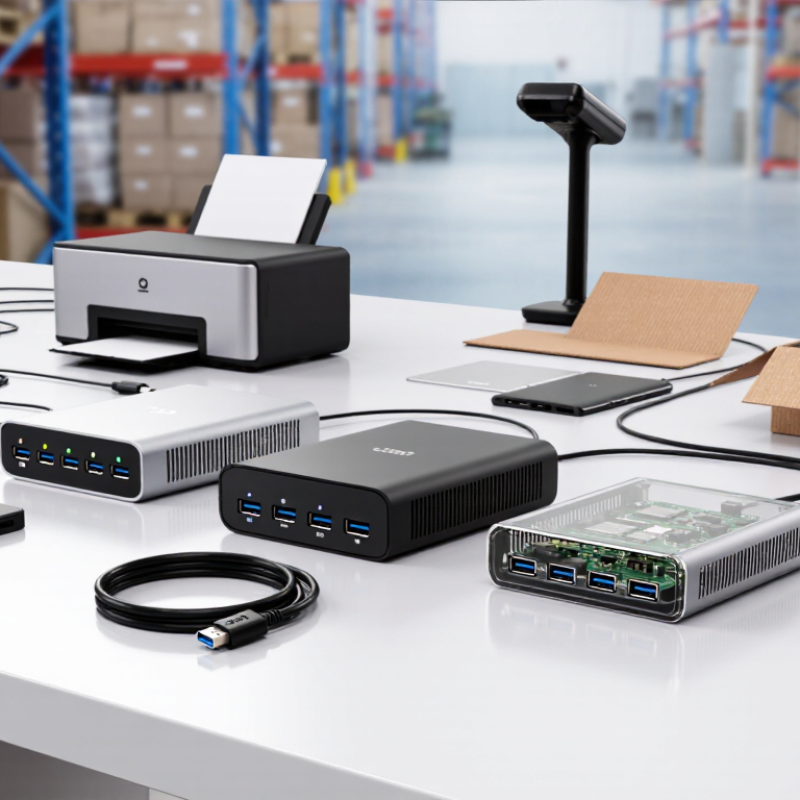
Before choosing a USB 2.0 hub for bulk buying, define the real working environment. Count every device, including keyboards, barcode scanners, printers, storage drives, and service tools. Record their connector types, cable lengths, power demands, and daily connection hours. A warehouse desk may need four ports, while a training room may need ten. Do not purchase by port count alone. That shortcut often creates unused stock.

The USB Implementers Forum USB 2.0 specification lists a theoretical transfer rate of 480 Mbps. Actual performance becomes lower when several devices share one upstream connection. The specification also defines 100 mA as the default current for an unconfigured device, with higher current available after proper configuration. Therefore, identify whether your users transfer files or mainly connect input devices. File-heavy work needs realistic speed testing. Basic peripherals need stable enumeration and strong port spacing. My practical concern is simple: one test unit cannot represent every batch condition.

Tips: Build a small requirement table before requesting quotations. Include ports, power design, housing material, cable length, packaging, and inspection standards. Test ten units from a sample batch, not only one. Check simultaneous connections, repeated plugging, heat, and recognition after sleep mode. Keep several spare units. Bulk savings mean little if replacements arrive late. Also, review the plan after deployment; user behavior may expose assumptions your spreadsheet missed.

Check Port Count, Power Needs, Compatibility, and Data Transfer Limits

How to Choose the Best USB 2.0 Hub for Bulk Buying?

Port count should match the real workspace, not an optimistic estimate. A four-port hub suits a keyboard, mouse, printer, and card reader. Larger teams may need seven or ten ports. Leave one spare port for unexpected devices. Port spacing also matters. Wide connectors can block adjacent sockets and waste capacity.

Power needs deserve careful checking. A bus-powered hub draws electricity from the computer, so several devices may cause unstable performance. A self-powered hub uses an external adapter and usually handles multiple accessories more reliably. Check the current rating for each port, especially when connecting external drives or devices with motors. Charging performance may be limited. It is easy to assume every port delivers the same power, but that assumption can be wrong.

Compatibility covers more than the connector shape. Confirm support for the computers, operating systems, and device types used by your buyers. USB 2.0 offers a theoretical 480 Mbps, but practical speeds are lower. All connected devices share the available bandwidth. Moving large files while using several peripherals can feel slow. Test a sample batch before placing a large order. I have found that printed specifications rarely reveal cable quality, heat buildup, or loose sockets. Inspect those details during evaluation. A lower price may look attractive, yet inconsistent performance creates replacement work later.

Compare Hub Design, Materials, Durability, and Safety Features

How to Choose the Best USB 2.0 Hub for Bulk Buying?

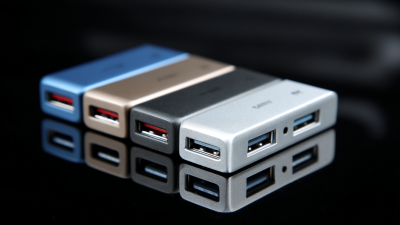
A practical hub design should match its working environment. A compact four-port model suits desks, classrooms, and service counters. A wider enclosure may prevent cable crowding during daily use. Check whether ports sit firmly in the housing. Loose sockets often fail before the electronics do. I once tested a low-cost batch with strong plastic shells, but several ports shifted after repeated cable insertion. The design looked reliable. It was not.

Material choice affects heat, impact resistance, and user confidence. ABS plastic keeps weight and cost low, while aluminum can improve rigidity and heat spreading. However, metal cases may expose sharp edges if finishing is careless. Look for smooth seams, reinforced cable exits, and flexible strain relief. Internal boards should be cleanly assembled, with no loose solder or uneven components. A sample inspection can reveal more than a product photograph.

Durability needs measurable checks. Ask suppliers about insertion-cycle testing, cable bending tests, and surface wear inspection. USB 2.0 supports transfer speeds up to 480 Mbps, but unstable power can still interrupt devices. Useful safety features include overcurrent protection, short-circuit protection, and controlled thermal performance. Confirm that testing records are current and traceable. Bulk purchasing magnifies small defects. One weak batch can create dozens of support problems. Allowing a modest inspection budget is often wiser than choosing the lowest quotation.

How to Choose the Best USB 2.0 Hub for Bulk Buying? - Compare Hub Design, Materials, Durability, and Safety Features

Evaluation Dimension Compact 4-Port Basic Hub 4-Port Powered Desktop Hub 7-Port Powered Hub Bulk-Buying Recommendation
USB standard USB 2.0 High-Speed; up to 480 Mbps theoretical bus speed USB 2.0 High-Speed; up to 480 Mbps theoretical bus speed USB 2.0 High-Speed; up to 480 Mbps theoretical bus speed Confirm that all ports and the upstream connection are USB 2.0 rather than mixed or lower-speed designs.
Port count 4 downstream USB-A ports 4 downstream USB-A ports 7 downstream USB-A ports Select the smallest port count that meets the application to reduce unused cost and packaging volume.
Power architecture Bus-powered; receives power through the host USB connection Externally powered; adapter supplies power independently of the host Externally powered; adapter supplies power independently of the host Use a powered design when several ports may operate simultaneously or when stable peripheral power is important.
Typical enclosure material Injection-molded ABS or polycarbonate plastic ABS/polycarbonate plastic, sometimes with an aluminum top or internal metal plate ABS/polycarbonate plastic or aluminum alloy enclosure Choose flame-retardant enclosure material with consistent wall thickness and secure port mounting.
Thermal behavior Low to moderate heat under normal bus-powered use Moderate heat; depends on the power adapter, regulator, and enclosure ventilation Moderate to higher heat under full load; larger enclosure is preferable Request temperature testing under maximum rated load and verify that ventilation openings do not expose unsafe parts.
USB connector construction Metal contacts in molded plastic housings Metal contacts with reinforced internal mounting or a secured PCB connector Metal contacts with reinforced mounting recommended for frequent plugging Inspect solder joints, connector alignment, shell retention, and port spacing before approving a large order.
Cable design Short fixed or detachable USB cable; often optimized for portability Detachable or fixed cable; desktop placement is usually more convenient Detachable or fixed cable; longer cable options may be available For USB 2.0, keep the total cable channel within the standard 5 m maximum unless an active extension is specifically designed for the application.
Power per downstream port Host-limited; standard USB 2.0 downstream power is commonly specified at up to 500 mA per port after enumeration May support higher total available current, but the exact per-port limit must be specified May support higher total available current, but the exact per-port and total limits must be specified Do not treat a powered hub as a universal charger; request the rated current limit for each port and for the complete unit.
Over-current protection Recommended electronic current limiting or resettable protection Should include per-port or grouped over-current protection Per-port protection is strongly preferred because more devices may be connected Request protection test results showing how the hub responds to a short circuit or excessive load.
Over-voltage and surge protection Basic protection may be included; verify the circuit design Recommended on the power input and downstream outputs Recommended on the power input and downstream outputs Ask for the protection component specifications rather than relying only on a general “safe” claim.
Power adapter safety Not applicable when no external adapter is supplied Adapter voltage, current, plug type, insulation, and applicable safety approvals must be verified Adapter voltage, current, plug type, insulation, and applicable safety approvals must be verified Match the adapter to the destination market and require consistent adapter specifications across the production batch.
Mechanical durability Suitable for light to moderate office or travel use Better suited to stationary use with reduced cable movement Best suited to stationary multi-device use when the enclosure and ports are reinforced Define a plug-in/withdrawal test method and inspect samples after testing; do not rely on appearance alone.
Size and portability Smallest and easiest to carry Medium footprint; suitable for desks and workstations Largest footprint; requires more desk space and cable management Compare packed dimensions and shipping weight because these directly affect bulk logistics cost.
LED indicators Usually one power or activity indicator Power indicator; individual port indicators may be available Power indicator; individual port indicators can simplify troubleshooting Choose low-brightness indicators for offices and confirm that LEDs do not create unnecessary heat.
Operating-system compatibility Generally works with common USB host operating systems when compliant with the USB specification Generally works with common USB host operating systems; external power does not guarantee compatibility Generally works with common USB host operating systems; test with target devices Perform compatibility testing with the actual computers, peripherals, and operating systems used by customers.
Best application Keyboard, mouse, flash drive, and other low-power peripherals Office desks, point-of-sale equipment, and several simultaneously connected peripherals Workstations, testing areas, classrooms, and shared equipment stations Base the selection on simultaneous device count, power demand, operating environment, and required portability.

Note: Performance, current limits, materials, protection circuits, adapter specifications, and certifications vary by production design. Confirm the final specification through samples, technical documentation, and batch inspection before placing a bulk order.

Evaluate Suppliers, Certifications, Pricing, and Minimum Order Quantities

How to Choose the Best USB 2.0 Hub for Bulk Buying?

Bulk buying requires more than comparing unit prices. Start by checking the supplier’s production experience, factory controls, and response speed. Request samples from the same production line planned for your order. Test every port, data stability, heat levels, and cable fit. A polished sample can hide inconsistent mass production.

Ask for current certification documents and laboratory test reports. Depending on your market, these may include CE, FCC, RoHS, or other required standards. Verify that the documents match the exact hub model, not a similar product. During one sourcing review, I focused too heavily on appearance and missed unstable connections after extended use. That mistake changed my inspection process.

Tips: Calculate the landed cost, including packaging, shipping, testing, and possible defect replacements. Compare pricing at several minimum order quantities. A lower price may require an impractical MOQ or weaker quality control. Ask whether the supplier can offer mixed colors, custom packaging, or staged deliveries. Negotiate carefully, but do not force an unrealistic price. It can encourage material substitutions. Also confirm payment terms, production time, warranty handling, and pre-shipment inspection rules in writing. Small details matter.

Test Samples and Confirm Quality Before Placing a Large Order

How to Choose the Best USB 2.0 Hub for Bulk Buying?

Before placing a large order, request several test samples from the same production batch. Do not inspect only the housing. Connect keyboards, mice, flash drives, and printers at the same time. Check whether every port works without random disconnections. Transfer a 1 GB file repeatedly. Record the actual speed, connection stability, and time required.

Test at the same time, under the same conditions.

Test the hub for several hours. Feel the case near the controller and power input. Warm is acceptable. Excessive heat deserves attention. Examine the cable length, plug fit, port spacing, and LED brightness. I once approved a sample that worked well, but its cable felt weak after repeated bending. That mistake changed my inspection checklist. A good sample can still hide batch variation. Ask for production photos, test records, and clear replacement terms. Independent inspection is wise when the order value is high.

Tips: Test at least three samples, not just one. Use the same computers and devices for each test. Write down every result. Check performance after waking the computer from sleep. Inspect packaging for crushed corners and loose parts. Ask whether the final batch will use identical components. Small changes can affect reliability. Do not approve quickly because the sample looks polished. Some faults appear only after repeated use.